High Performance Network (HPN)
In 2027, three of our four medical plans’ provider networks will transition to a high-performance network (HPN)… our Bronze Plan, our Silver Plan, and our Consumer Driven Health Plan. Our Gold Plan’s provider networks will remain the same as they are in 2026. Members considering the Bronze, Silver, or CDHP should check their preferred providers to confirm that they will be accessible in the medical plan they choose to enroll in for 2027.
To check your providers in these 3 plans, visit https://bluehpnquiz.anthem.com/ and click the orange button that says “Start Evaluation Quiz”. On the next screen, enter your home zip code* and click the button that says “Go”.
If the next screen says “Good news: BlueHPN is available in your area.” you may proceed with checking your preferred doctors, specialists, or hospitals by clicking the button that says “Yes”. In the new window that opens, update your location (in the field below where it says “Find Care”) and enter the name of the doctor/hospital in the Search field. Providers that are in-network will say “In-Network” under their image and will feature a green checkmark.
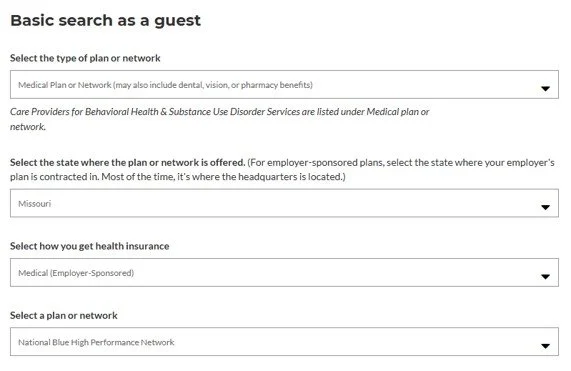
If your zip code* generates an orange exclamation point (!), followed by “Thank you for your interest in BlueHPN.”, you will need to search for your preferred doctors, specialists, or hospitals by visiting www.anthem.com/find-care/ and following the instructions provided here and shown below. Scroll down to find “Basic search as a guest” and clicking on that option. Step 1: Where it says, “Select the type of plan or network”, select “Medical Plan or Network (may also include dental, vision, or pharmacy benefits)”. Step 2: Where it says “Select the state where the plan or network is offered.”, select “Missouri”. Step 3: Where it says, “Select how you get health insurance”, select “Medical (Employer Sponsored)”. Step 4: Where it says, “Select a plan or network”, select “Blue Access” and then click the “Continue” button. Then on the next screen, Step 5: Enter your location (in the field below where it says “Find Care”). Step 6: Search for the provider you are focused on. Providers that are in-network will say “In-Network” under their image and will feature a green checkmark.
*Zip code used in the search should be the employee’s home zip code in Workday.

Click www.evertruebenefits.org/annual-enrollment or the image below to return to the main 2027 Annual Enrollment page.